MeeBhoomi మీభూమి (MeeBhoomi)
MeeBhoomi (translating to "Your Land") is the official digital land records repository launched by the Government of Andhra Pradesh in June 2015. It serves as a transparent interface for citizens to access critical documents like the Adangal and Record of Rights (1-B) without visiting the Tahsildar's office.
మీభూమి (MeeBhoomi) అనేది ఆంధ్రప్రదేశ్ ప్రభుత్వం 2015 జూన్లో ప్రారంభించిన అధికారిక డిజిటల్ భూ రికార్డుల పోర్టల్. ఇది పౌరులు తహసీల్దార్ కార్యాలయానికి వెళ్లాల్సిన అవసరం లేకుండా అడంగల్ మరియు రికార్డ్ ఆఫ్ రైట్స్ (1-B) వంటి కీలక పత్రాలను పొందడానికి ఒక పారదర్శక వేదికగా పనిచేస్తుంది.
The portal digitizes land data across all 26 districts of Andhra Pradesh, allowing landowners to verify ownership details, check crop data, and even link their Aadhaar numbers to their survey numbers for added security.
ఈ పోర్టల్ ఆంధ్రప్రదేశ్లోని మొత్తం 26 జిల్లాల భూమి డేటాను డిజిటలైజ్ చేస్తుంది. దీని ద్వారా భూ యజమానులు తమ యాజమాన్య వివరాలను ధృవీకరించుకోవచ్చు, పంట వివరాలను తనిఖీ చేయవచ్చు మరియు భద్రత కోసం తమ ఆధార్ నంబర్ను సర్వే నంబర్తో లింక్ చేయవచ్చు.
Online Services Dashboard ఆన్లైన్ సేవల డ్యాష్బోర్డ్
| Feature లక్షణం | Details వివరాలు |
|---|---|
| Portal Name పోర్టల్ పేరు | MeeBhoomi AP (మీభూమి) |
| Managed By నిర్వహణ | Department of Revenue, Govt of Andhra Pradesh రెవెన్యూ శాఖ, ఆంధ్రప్రదేశ్ ప్రభుత్వం |
| Core Documents ప్రధాన పత్రాలు | Adangal (Pahani), ROR 1-B, FMB అడంగల్ (పహానీ), ROR 1-B, FMB |
| Languages భాషలు | Telugu & English తెలుగు & ఇంగ్లీష్ |
| Key Services ప్రధాన సేవలు |
|
| Official URL అధికారిక వెబ్సైట్ | meebhoomi.ap.gov.in |
Understanding Key MeeBhoomi Documents
మీభూమి పత్రాలను అర్థం చేసుకోవడం
1. What is Adangal (Pahani)?
1. అడంగల్ (పహానీ) అంటే ఏమిటి?
The Adangal (also known as Pahani in other states) is the primary land record maintained by the Village Revenue Officer. It contains:
అడంగల్ (దీనిని పహానీ అని కూడా అంటారు) అనేది గ్రామ రెవెన్యూ అధికారి నిర్వహించే ప్రాథమిక భూ రికార్డు. ఇందులో ఈ వివరాలు ఉంటాయి:
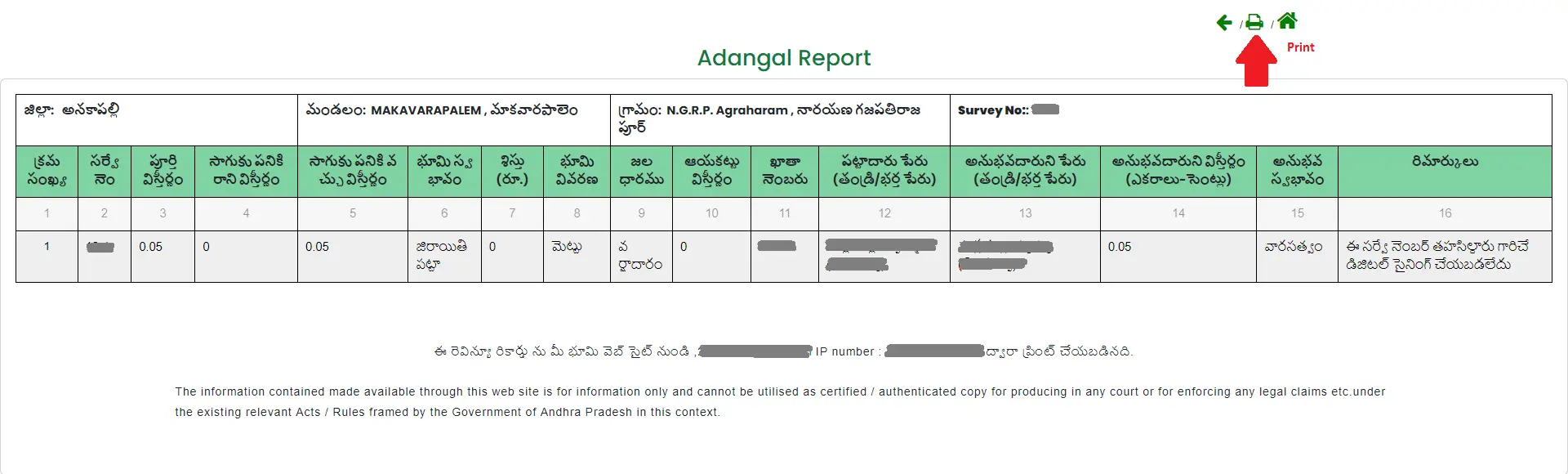
- Owner Details: Name of the landholder.
- Land Type: Classification of soil and land nature (Wet/Dry).
- Cultivation: Crops grown, water sources, and yield estimation.
- Liabilities: Details of existing loans or mortgages on the land.
- యజమాని వివరాలు: భూమి కలిగి ఉన్న వ్యక్తి పేరు.
- భూమి రకం: నేల మరియు భూమి స్వభావం (మెట్ట/మాగాణి).
- సాగు వివరాలు: పండించిన పంటలు, నీటి వనరులు మరియు దిగుబడి అంచనా.
- అప్పులు: భూమిపై ఉన్న రుణాలు లేదా తాకట్టు వివరాలు.
2. What is ROR 1-B?
2. 1-B రికార్డు అంటే ఏమిటి?
The Record of Rights (1-B) is the legal proof of land ownership. Unlike the Adangal which focuses on cultivation, the 1-B is strictly an ownership title record used for:
రికార్డ్ ఆఫ్ రైట్స్ (1-B) అనేది భూ యాజమాన్యానికి చట్టపరమైన ఆధారం. అడంగల్ సాగుపై దృష్టి సారిస్తే, 1-B పూర్తిగా యాజమాన్య హక్కుల రికార్డు. ఇది దీనికి ఉపయోగపడుతుంది:
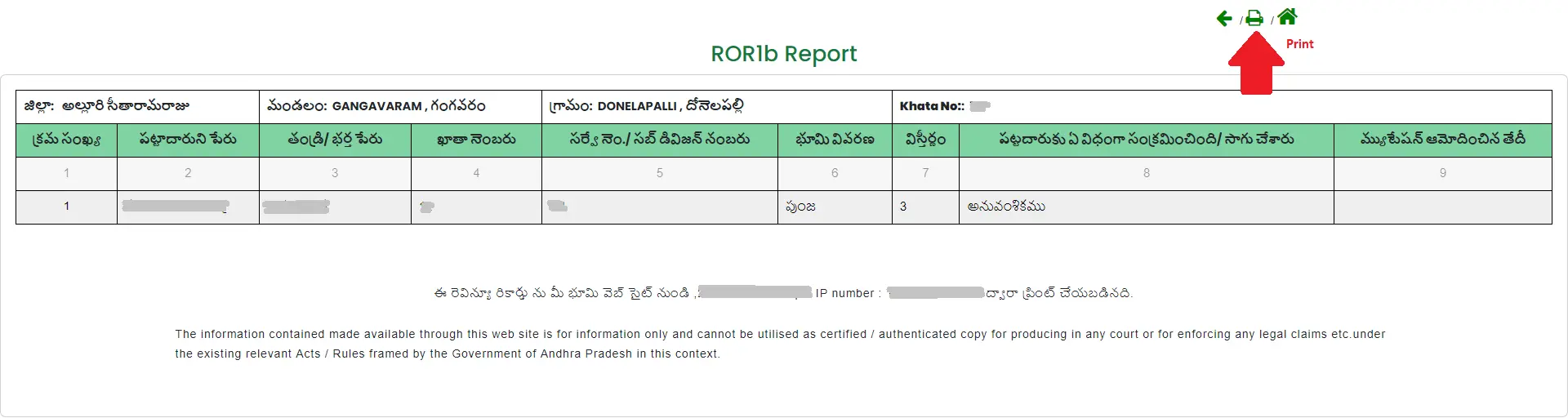
- Obtaining bank loans.
- Property registration and sales.
- Legal disputes in court.
- బ్యాంకు రుణాలు పొందడానికి.
- ఆస్తి రిజిస్ట్రేషన్ మరియు అమ్మకాలకు.
- కోర్టులో న్యాయపరమైన వివాదాలకు.
3. Field Measurement Book (FMB)
3. ఫీల్డ్ మెజర్మెంట్ బుక్ (FMB)
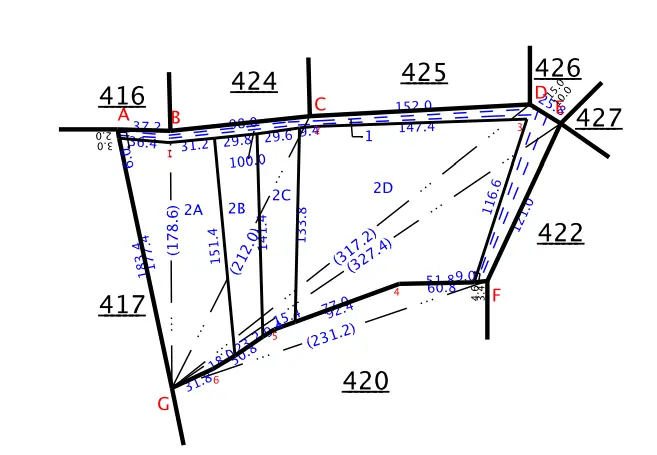
The FMB contains the sketch of land boundaries as per official survey records. It is crucial for resolving boundary disputes between neighbors. The MeeBhoomi portal allows you to download these sketches digitally.
FMB లో అధికారిక సర్వే రికార్డుల ప్రకారం భూమి సరిహద్దుల స్కెచ్ ఉంటుంది. పొరుగువారి మధ్య సరిహద్దు వివాదాలను పరిష్కరించడంలో ఇది కీలకం. మీభూమి పోర్టల్ ద్వారా మీరు ఈ స్కెచ్లను డౌన్లోడ్ చేసుకోవచ్చు.
How to Download Your Adangal Online
ఆన్లైన్లో అడంగల్ డౌన్లోడ్ చేయడం ఎలా?
Follow these steps to view your land details on the official portal:
అధికారిక పోర్టల్లో మీ భూమి వివరాలను చూడటానికి ఈ దశలను అనుసరించండి:
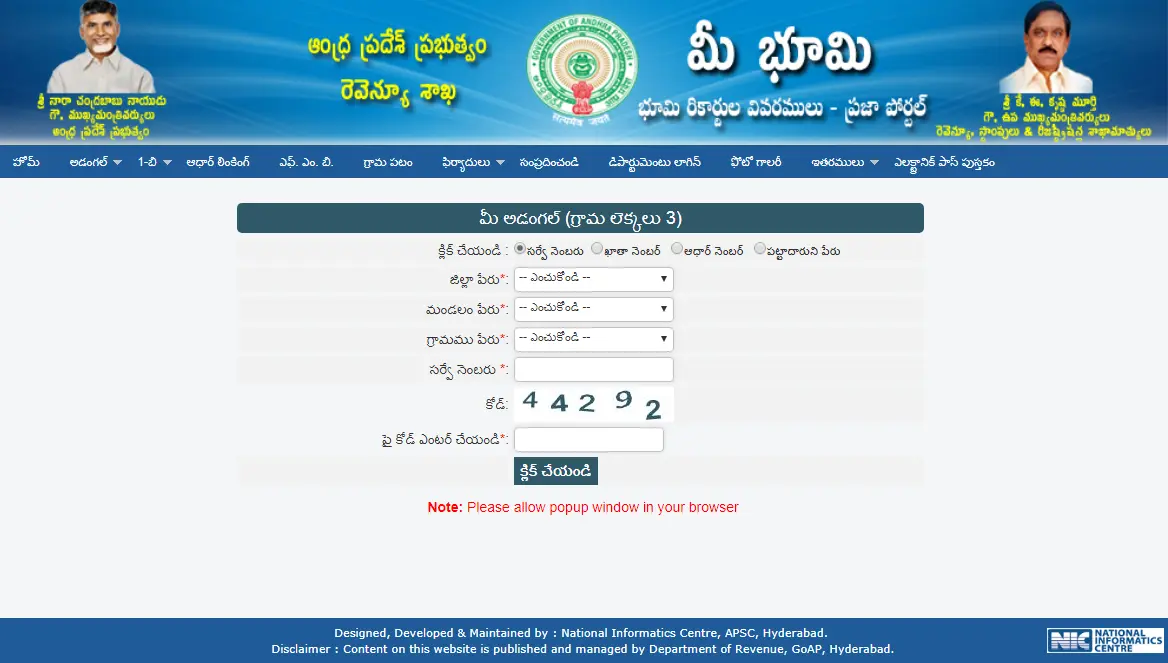
- Visit the Portal: Go to meebhoomi.ap.gov.in.
- Select 'Adangal': In the menu, choose "Your Adangal" (Personal) or "Village Adangal" (Public).
- Enter Location Details: Select your District, Mandal, and Village from the dropdowns.
- Search Method: You can search using:
- Survey Number
- Account (Khata) Number
- Aadhaar Number
- Pattadar Name
- Verify & Submit: Enter the Captcha code and click "Click" to generate the report.
- పోర్టల్ను సందర్శించండి: meebhoomi.ap.gov.in కు వెళ్లండి.
- 'అడంగల్' ఎంచుకోండి: మెనూలో "మీ అడంగల్" లేదా "గ్రామ అడంగల్" ఎంచుకోండి.
- లొకేషన్ వివరాలు: మీ జిల్లా, మండలం మరియు గ్రామాన్ని ఎంచుకోండి.
- సెర్చ్ పద్ధతి: మీరు వీటి ద్వారా వెతకవచ్చు:
- సర్వే నంబర్
- ఖాతా నంబర్
- ఆధార్ నంబర్
- పట్టాదారు పేరు
- సబ్మిట్ చేయండి: క్యాప్చా కోడ్ నమోదు చేసి "Click" పై నొక్కండి.
How to Link Aadhaar with Land Records
భూ రికార్డులతో ఆధార్ లింక్ చేయడం ఎలా?
Linking Aadhaar prevents fraudulent transactions. To check your status:
ఆధార్ లింకింగ్ మోసపూరిత లావాదేవీలను నిరోధిస్తుంది. మీ స్టేటస్ తనిఖీ చేయడానికి:
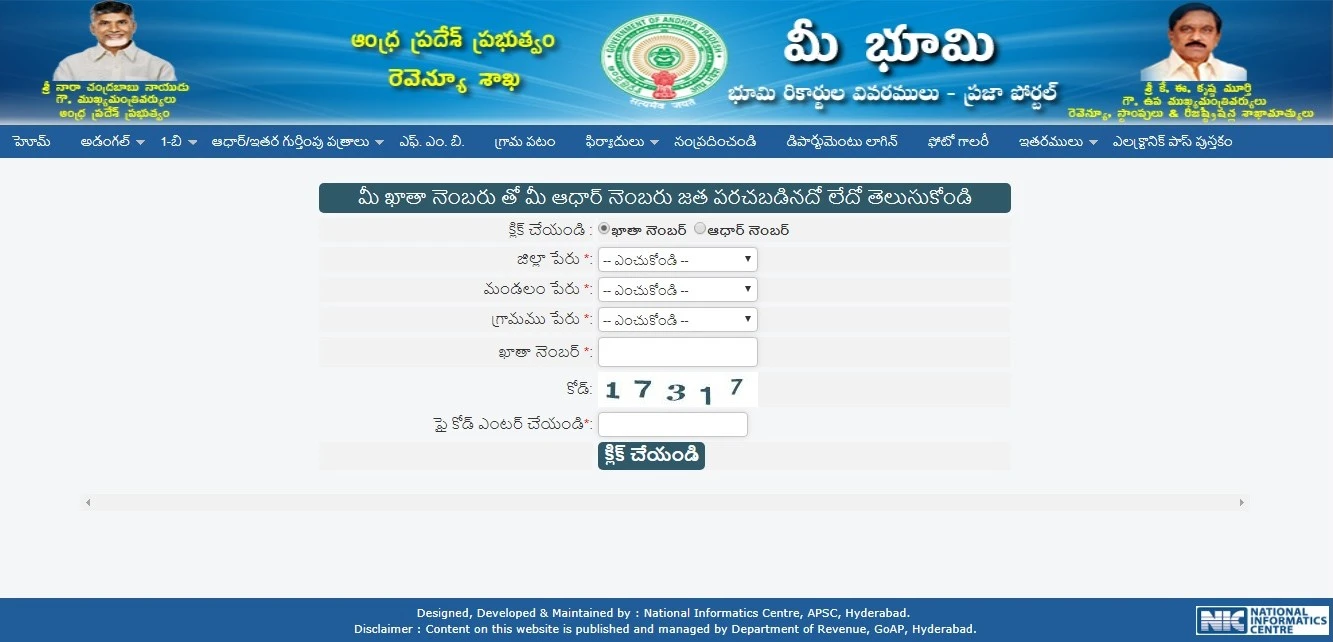
- Go to the "Aadhaar/Other Identities" menu.
- Select "Aadhaar Linking".
- Enter the District, Zone, Village, and Account Number.
- The system will display if your KYC is completed or pending.
- "Aadhaar/Other Identities" మెనూకు వెళ్లండి.
- "Aadhaar Linking" ఎంచుకోండి.
- జిల్లా, మండలం, గ్రామం మరియు ఖాతా నంబర్ను నమోదు చేయండి.
- మీ KYC పూర్తయిందా లేదా పెండింగ్లో ఉందా అని సిస్టమ్ చూపిస్తుంది.
How to Find Your Survey Number Without Physical Documents
పత్రాలు లేకుండా మీ సర్వే నంబర్ను కనుగొనడం ఎలా?
If you have misplaced your original land papers, you can still identify your Survey Number using the portal's built-in search tools.
మీ ఒరిజినల్ భూమి పత్రాలు పోయినట్లయితే, పోర్టల్ సెర్చ్ టూల్స్ ఉపయోగించి మీ సర్వే నంబర్ను కనుగొనవచ్చు.
1. Search by Name (Pattadar Name)
1. పేరు ద్వారా వెతకడం (పట్టాదారు పేరు)
This method is ideal if you are certain of the name registered in the revenue records:
రెవెన్యూ రికార్డుల్లో నమోదైన పేరు మీకు ఖచ్చితంగా తెలిస్తే ఈ పద్ధతి సరైనది:
- Access the Search: Go to the Adangal or 1-B section of the MeeBhoomi site.
- Select "Pattadar Name": Instead of inputting a number, select the "Pattadar Name" (పట్టాదారు పేరు) radio button.
- Refine Your Search: Enter the owner’s name.
- Expert Tip: Revenue records often use initials or surnames differently. If the full name doesn't work, try searching with just the surname to find a list of all family holdings in that village.
- Locate Results: A list will populate showing the names of owners along with their associated Survey Numbers and Khata Numbers.
- సెర్చ్ ఓపెన్ చేయండి: మీభూమి సైట్లోని అడంగల్ లేదా 1-B విభాగంకి వెళ్లండి.
- "పట్టాదారు పేరు" ఎంచుకోండి: నంబర్కు బదులుగా "పట్టాదారు పేరు" ఆప్షన్ ఎంచుకోండి.
- సెర్చ్ చేయండి: యజమాని పేరు నమోదు చేయండి.
- చిట్కా: రికార్డుల్లో ఇంటి పేర్లు లేదా ఇనిషియల్స్ వేరుగా ఉండవచ్చు. పూర్తి పేరు పని చేయకపోతే, కేవలం ఇంటి పేరుతో ప్రయత్నించండి.
- ఫలితాలు: యజమానుల పేర్లు, వాటికి సంబంధించిన సర్వే నంబర్లు మరియు ఖాతా నంబర్ల జాబితా వస్తుంది.
2. Using the "Village Map" (Visual Search)
2. "గ్రామ పటం" ఉపయోగించి (విజువల్ సెర్చ్)
If text-based searches fail, a visual "Cadastral Map" can help you identify your land based on its physical location:
టెక్స్ట్ సెర్చ్ పని చేయకపోతే, మీ భూమి ఉన్న లొకేషన్ ఆధారంగా మ్యాప్ ద్వారా కనుగొనవచ్చు:
- Open Village Maps: Click on the "Village Map" (గ్రామ పటం) icon on the home page.
- Navigate to Your Area: Input your location details to load the village map.
- Identify by Landmarks: Use recognizable features like village roads, irrigation canals, or the position of neighboring plots to find your land on the map.
- Read the Survey ID: Every demarcated boundary box on the map contains a number. This number is your Survey Number.
- గ్రామ పటం తెరవండి: హోమ్ పేజీలోని "Village Map" (గ్రామ పటం) పై క్లిక్ చేయండి.
- మీ ప్రాంతానికి వెళ్లండి: మీ గ్రామం వివరాలను నమోదు చేసి మ్యాప్ లోడ్ చేయండి.
- గుర్తులు చూడండి: రోడ్లు, కాలువలు లేదా పొరుగు పొలాలను చూసి మీ భూమిని గుర్తించండి.
- సర్వే ID చూడండి: మ్యాప్లోని ప్రతి బాక్స్లో ఒక నంబర్ ఉంటుంది. అదే మీ సర్వే నంబర్.
3. Using the BhuNaksha Portal
3. భూనక్ష పోర్టల్ ఉపయోగించి
The BhuNaksha AP tool provides a sophisticated way to view land records overlaid on satellite imagery:
BhuNaksha AP టూల్ ద్వారా మీరు శాటిలైట్ మ్యాప్లో భూమి రికార్డులను చూడవచ్చు:
- Satellite Overlay: This tool allows you to see actual trees, fences, and buildings on your property via a Google Maps-style view.
- Coordinate Identification: By clicking on the specific physical area of your land on the satellite map, the system will automatically pull up the official Survey Number and owner details associated with those geographic coordinates.
- శాటిలైట్ వ్యూ: గూగుల్ మ్యాప్స్ లాగా మీ పొలంలోని చెట్లు, కంచెలు మరియు భవనాలను చూడవచ్చు.
- గుర్తింపు: శాటిలైట్ మ్యాప్లో మీ భూమిపై క్లిక్ చేస్తే, దానికి సంబంధించిన సర్వే నంబర్ మరియు యజమాని వివరాలు ఆటోమేటిక్గా వస్తాయి.
Official Authority Directory
అధికారుల వివరాలు
If your inquiry requires official administrative action rather than general information, you should contact the following authorities directly:
మీ సమస్యకు సాధారణ సమాచారం కాకుండా, అధికారిక చర్య అవసరమైతే, ఈ క్రింది అధికారులను సంప్రదించండి:
| Type of Inquiry సమస్య రకం | Contact Authority ఎవరిని సంప్రదించాలి |
|---|---|
| Correction in Land Records భూ రికార్డుల్లో సవరణలు | Mandal Revenue Officer (MRO) / Local Tahsildar Office మండల రెవెన్యూ అధికారి (MRO) / తహసీల్దార్ కార్యాలయం |
| Aadhaar Seeding Issues ఆధార్ సీడింగ్ సమస్యలు | Village Revenue Officer (VRO) at your local Grama Sachivalayam మీ గ్రామ సచివాలయంలోని VRO |
| Land Conversion (NALA) భూ మార్పిడి (NALA) | Revenue Divisional Officer (RDO) రెవెన్యూ డివిజనల్ అధికారి (RDO) |
| Official Technical Support సాంకేతిక సహాయం | [email protected] |
Frequently Asked Questions (FAQ)
తరచుగా అడిగే ప్రశ్నలు (FAQ)
What is the difference between Adangal and 1-B?
Adangal provides cultivation and land nature details, while 1-B acts as the legal title deed proving ownership.
అడంగల్ మరియు 1-B మధ్య తేడా ఏమిటి?
అడంగల్ అనేది సాగు మరియు భూమి స్వభావం వివరాలను ఇస్తుంది. 1-B అనేది యాజమాన్యాన్ని నిరూపించే చట్టపరమైన పత్రం.
Can I use the downloaded Adangal for bank loans?
Yes, the electronically signed Adangal and 1-B records from MeeBhoomi are valid for loan processing and official verification.
డౌన్లోడ్ చేసిన అడంగల్ను బ్యాంకు రుణాలకు వాడవచ్చా?
అవును, మీభూమి నుండి తీసుకున్న ఎలక్ట్రానిక్ సంతకం కలిగిన అడంగల్ మరియు 1-B రికార్డులు రుణాలకు చెల్లుతాయి.
How do I fix errors in my land records?
You can file a complaint directly on the portal under the "Complaints" section or visit the nearest MeeSeva center to request a correction.
భూ రికార్డుల్లో తప్పులను ఎలా సరిదిద్దుకోవాలి?
మీరు పోర్టల్లోని "Complaints" విభాగంలో ఫిర్యాదు చేయవచ్చు లేదా సవరణ కోసం దగ్గరలోని మీసేవా (MeeSeva) కేంద్రాన్ని సందర్శించవచ్చు.
Is the FMB sketch available for all villages?
FMB sketches are being digitized progressively. If your village map is not available online, you must visit the Mandal Revenue Office (MRO).
అన్ని గ్రామాలకు FMB స్కెచ్ అందుబాటులో ఉందా?
FMB స్కెచ్లు క్రమంగా డిజిటలైజ్ చేయబడుతున్నాయి. మీ గ్రామ పటం ఆన్లైన్లో లేకపోతే, మీరు MRO కార్యాలయాన్ని సంప్రదించాలి.